Payment API JWT MiddleWare Implementation
In order to be able to use the Payment API endpoints every request except those to GetWidget and the Webhook endpoints will require JWT token authorization.
There are going to be two tokens used through out the API.
1. The JWT token on GetWidget endpoint (user not logged in)
Most of our partner use the endpoint GetWidget to get the widget html. The html will contain the jwt-token inside the HTML as it currently contains the data-apikey. Below we can see a sample of how the widget html looks with the jwt-token attribute:
<style id="mobilum-widget-css"></style>
<link
  href="https://widget-static.nightly.mobilum.m.xcard.io/css/app.css"
  rel="stylesheet"
>
<div
  id="mobilum-widget"
  data-apikey="a7cc0318-66f0-494d-8ee4-0d0dbc612988"
  jwt-token="eyJhbGciOiJIUzM4NCJ9.eyJuYmYiOiIxNjc0MTMxNjM4Iiwic2l0ZVVVSUQiOiI5MzdiNGMzZi1kOTc5LTQxMzMtYjgyOS01Mjg4NzViM2MwZGUiLCJleHAiOiIxNjc0MTUzMjM4IiwiaWF0IjoiMTY3NDEzMTYzOCJ9.nq0kZbf4L_shBXS0Jbje17SRZIVSw_oNhWU4fudFRd-soBh7HdHpcaZwwsJh-If-"
>
  <div id="userUUid" style="display:none"></div>
  <div
    id="widgetUuid"
    style="display:none"
  >d4c595e3-253c-432c-a279-aa008a2fdf27</div>
</div>
<script
  src="https://widget-static.nightly.mobilum.m.xcard.io/js/app.js"
></script>
So in the front-end there should be developed a feature so that on every request that they send to the Payment API they should send the token. An example of a request sent with together with token is as below:
// Verify code via Fetch API
fetch(
  'https://localhost:5002/Widget/VerifyAnyCode?code=988959&email=vonare2600%40prolug.com',
  {
    method: 'GET',
    headers: {
      accept: 'text/plain',
      apikey: 'a7cc0318-66f0-494d-8ee4-0d0dbc612988',
      Authorization:
        'eyJhbGciOiJIUzM4NCJ9.eyJuYmYiOiIxNjc0MTMxNjM4Iiwic2l0ZVVVSUQiOiI5MzdiNGMzZi1kOTc5LTQxMzMtYjgyOS01Mjg4NzViM2MwZGUiLCJleHAiOiIxNjc0MTUzMjM4IiwiaWF0IjoiMTY3NDEzMTYzOCJ9.nq0kZbf4L_shBXS0Jbje17SRZIVSw_oNhWU4fudFRd-soBh7HdHpcaZwwsJh-If-'
    }
  }
)
  .then(response => response.text())
  .then(data => console.log(data))
  .catch(err => console.error(err))
At the endpoint ` GetWidget ` if the site calling this endpoint is a fiat-only site then it will automatically receive the JWT token with the permission that the user passed the log-in because they manage the login on their side, other wise the token will lack of that permission. The return of unauthorized call is as below:
{
  "success": false,
  "result": null,
  "text": null,
  "errors": [
    {
      "message": "No session or session is expired!",
      "code": 98
    }
  ]
}
2. The JWT token on GetWidget endpoint (user logged in)
When the user logs in through the OTP verification, on that event so when the widget calls the endpoint widget/VerifyAnyCode on the becakend if the OTP passess successfully the response will be as below:
{
  "redirectUrl": "Profile",
  "responseType": null,
  "followUrl": null,
  "success": true,
  "result": {
    "name": "Gentian",
    "surname": "Strana",
    "country": "Canada",
    "dob": "1999-08-26T00:00:00",
    "kycVerified": true,
    "kycInProgress": false,
    "kycFailed": false,
    "userUuid": "2146f970-95ba-4940-b4bd-761b221ec804",
    "JwtToken": "eyJhbGciOiJIUzUxMiIsInR5cCI6IkpXVCJ9.eyJzaXRlVVVJZCI6ImQ1Mjg4YTcyLWNlNGItNGNhZi04ZjAxLWJjOTljZjY5MTAwYiIsInVzZXJVVUlkIjoiZTg2YTg1ZjItNzE2Ny00NGJlLTljM2ItZDIxNjQ1ZDY1ZTlhIiwicGVybWlzc2lvbnMiOiJVc2VyTXVzdEJlTG9nZ2VkSW4iLCJuYmYiOjE2NzQxMzE4NjgsImV4cCI6MTY3NDE1MzQ2OCwiaWF0IjoxNjc0MTMxODY4fQ.JvjfYJjOF2rULzj4pGWhVlXSrrKyrxBaNHJVYkhBTjBv3xhOC0OnelRg3IbJjQD5Zlr-chIa5v93Dz-hr7QEyw"
  },
  "text": null,
  "errors": []
}
So now we see that under the result JwtToken attribute there is a new property which contains the permission that user passed logging in. The existing token even though it might still be valid on it’s life span should now on be replaced with this new one because most of the endpoints that are called after the OTP login require the extra permission that is on this new token. It is to be developed on the frontend this switch of jwt tokens to be handled.
Below we will show the difference of the two tokens:

3. Partners that only use Payment API Public
For these partners they should adapt to call the endpoint ` GetWidget` and from there to get the token and then use it in the further HTTTP-calls.
For a smooth transition to production and partners adaptation, the token usage enforcement is configurable per site so for each partner we can decide if we want to enforce the usage of JWT token.
HMAC Implementation example in Java
import javax.crypto.Mac;
import javax.crypto.spec.SecretKeySpec;
import java.nio.charset.StandardCharsets;
import java.util.Base64;

// Your data and secret key
String data = "string-to-encode";
String secretKey = "your-secret-key";

// Encode the data and secret key as bytes
byte[] dataBytes = data.getBytes(StandardCharsets.UTF_8);
byte[] secretKeyBytes = Base64.getDecoder().decode(secretKey);

// Create an HMAC-SHA256 key specification
SecretKeySpec secretKeySpec = new SecretKeySpec(secretKeyBytes, "HmacSHA256");

// Initialize the HMAC-SHA256 algorithm
Mac hmacSha256 = Mac.getInstance("HmacSHA256");
hmacSha256.init(secretKeySpec);

// Compute the HMAC-SHA256 signature
byte[] signatureBytes = hmacSha256.doFinal(dataBytes);

// Encode the signature as a Base64 string
String serverSignature = Base64.getEncoder().encodeToString(signatureBytes);
JWT Authentication
Dashboard JWT Authentication with refresh tokens
Authentication is implemented with JWT access tokens and refresh tokens. On successful authentication the API returns a short lived JWT access token that expires after 5-10 minutes (it’s configurable as environment variable), and a refresh token that expires after 3 hours (it’s configurable as environment variable) in an HTTP Only cookie. The JWT is used for accessing secure routes on the API and the refresh token is used for generating new JWT access tokens when (or just before) they expire.
HTTP Only cookies are used for refresh tokens to increase security because they are not accessible to client-side javascript which prevents XSS (cross site scripting) attacks, and refresh tokens only have access to generate new JWT tokens (via the /api/UserApi/RefreshToken route) which prevents them from being used in CSRF (cross site request forgery) attacks.
API endpoints
Dashboard API has the following endpoints/routes for authenticating with JWT, refreshing and revoking tokens, and accessing secure routes:
1. Authenticate
/api/UserApi/Authenticate - public route that accepts POST requests containing a username and password in the body. On success a JWT access token is returned, and an HTTP Only cookie containing a refresh token. Http call sample below:
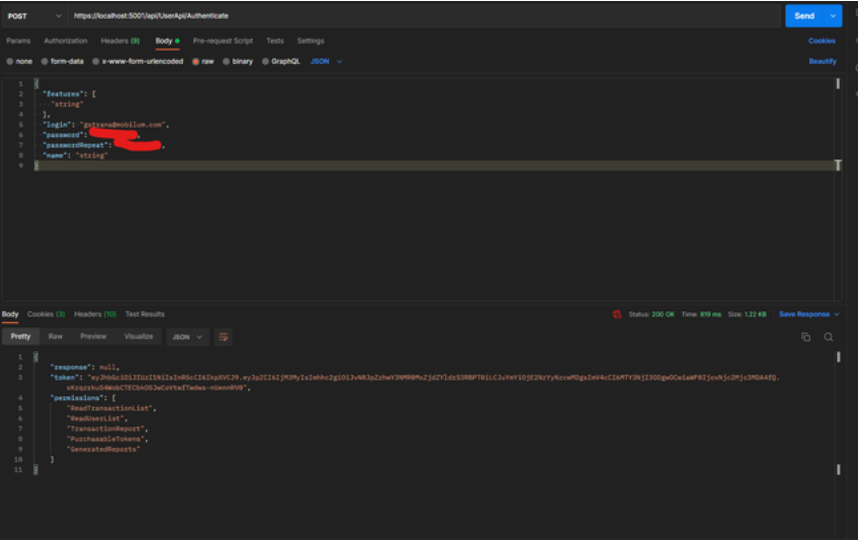
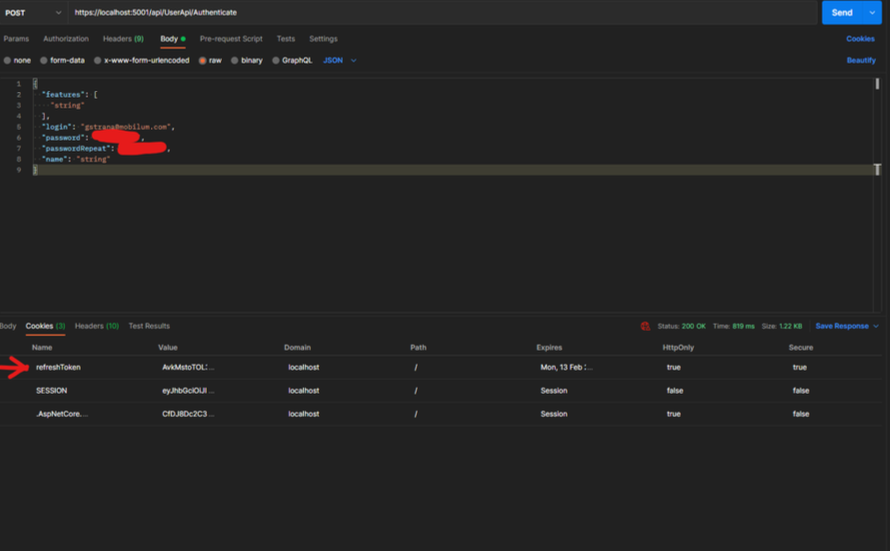
From the picture above we can see how call the endpoint to log-in and get the JWT. Also in the next picture you can see that the server has already returned a HTTP Only cookie which will later be used to get new JWT.
Refresh token
/api/UserApi/RefreshToken - public route that accepts POST requests containing a cookie with a refresh token. On success a new JWT access token is returned with basic user details, and an HTTP Only cookie containing a new refresh token (see just refresh token rotation below for an explanation).
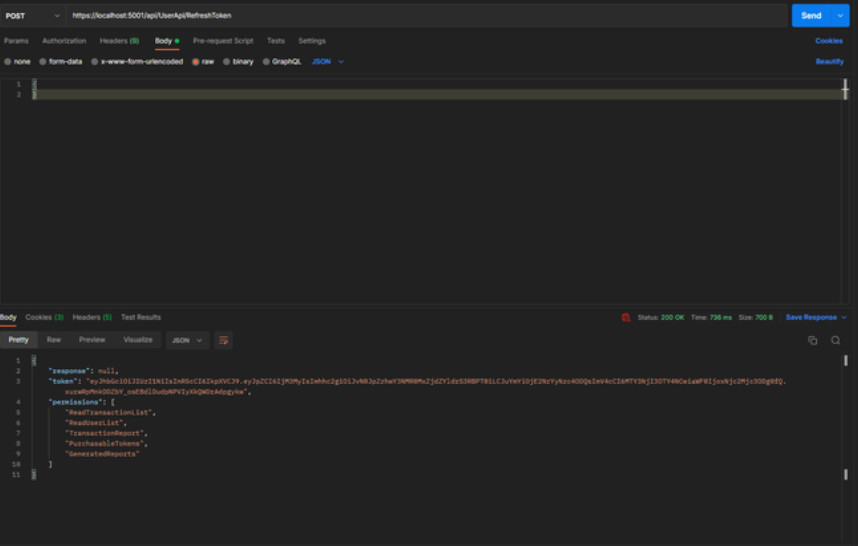
Also on every call at this endpoint a new refresh token is stored on HTTP Only Cookie, so the user will continue working without having to logout.
If you try to call endpoint with an invalid or revoked refresh token response is as below

Revoke Token
/api/UserApi/RevokeToken - secure route that accepts POST requests containing a refresh token either in the request body or in a cookie, if both are present priority is given to the request body. On success the token is revoked and can no longer be used to generate new JWT access tokens.

Frontend developments that are needed
For better user experience the features below should be developed/handled on frontend.
Develop a http interceptor that for each http request sent to server interecepts the call and does the following actions:
Check if the JWT is expired.
If yes, call the /api/UserApi/RefreshToken endpoint. If this endpoint on success returns a new JWT, then procceed the request with the new JWT, if the response did not return the new JWT return user to log-in page, user is not authorized.
If the JWT is not expired, check if its remaining lifetime is less than two minutes. If yes, call the /api/UserApi/RefreshToken endpoint. If the response returns a new JWT, proceed with the request using the new token. If not, return the user to the log-in page (user is not authorized).
Else the JWT lifetime is longer than two minutes, proceed to call the endpoint as normal.
When user logs out FE must call /api/UserApi/RevokeToken so the app does not generate new JWT and allows user to proceed again without providing username and password.
One hint for FE is that axios should be added configuration as below to allow credentials